Archive for the ‘Computing’ Category

Spammity spam

by niddler on 11th September, 2017

I used to get a lot of spam – particularly to random email addresses@niddler.com (sales@, marketing@ were among the most common) – I ended up creating a spam-sink; an email account I never used, which took all the most common spam-targets and effectively dropped them into a black hole.

When signing up for stuff I tend to give them an email address which is their company name at my domain – it makes it surprisingly easy to find emails from a particular vendor AND it means I know if their database has been hacked. Initially I tried contacting these companies to warn them that their email database had been compromised, but I’ve long since given up as it took forever to get to anyone technical, and they ALWAYS said the problem was at my end – not theirs. Needless to say, those companies no longer get my business.

Anyway, finally I found I was getting more and more spam to my email address that all my friends use. With the significant rise in malware, my address was being harvested directly from their accounts… and I can hardly start blocking them (well, it would be a little unkind).

THEN I started getting spam purporting to be FROM those friends – I even blogged about it.

…it turns out their accounts hadn’t been hacked by the usual means, but by something a bit more obscure – specifically from yahoo addresses – where yahoo had been hacked (the biggest ever… probably).

Anyway, I’ve got a google apps account, and for all the bad stuff said about the mountain view chocolate factory, they are really very good at differentiating spam and ham. There’s the odd bit of low-grade marketing emails that go into my spam, but I’ve not had a genuine ‘ham‘ go there for years.

I keep an eye on the volume of spam that I get, largely out of curiosity, and google delete it after a month – so it’s a kind of rolling monthly score. There was a time when it numbered in the thousands… and today I had a peek. It turned out I could unsubscribe from mailings from reputable companies that were sending out low-grade marketing junk, so I tried that and deleted the emails (never unsubscribe from something you didn’t sign up to – it’s just a way of saying ‘yep, someone reads the emails sent here’, and will get you much MORE spam!)… that left me with 10 (ten).

…I can’t work out if it’s the global fight against spam (which has had some fairly major victories) or something to do with the DKIM signature I’ve added to my domain somehow frightening off the spammers (on the bright side, as I’ve done that, it means you’re much less likely to ‘lose’ my emails into the spam folder… not that I have the time to email anyone anyway!).

Anyway, long rambling way of saying “anyone else noticing less spam these days?”. Perhaps the global market for Viagra has dipped…

New Home

by niddler on 14th June, 2014

Well, after something approach 15 years (by my guess) I’ve grown up and stopped sponging off the highly-patient James, who has provided my web hosting for all this time (at cost price) – and I’ve gone and got myself a proper hosting.

It’s been a bit interesting, and I hope I didn’t lose too many of Mrs Niddler’s emails, nor those of The Mother Ship – but having done so it’s given me plenty of opportunities too – so for instance I’ve moved my blog into its own subdomain (blog.niddler.com) and mucked around with WordPress installations like they’re going out of fashion… and I’ve learned a few things along the way.

Hopefully both my faithful readers will be able to continue to read my blog without noticing a whole lot of difference…

2048

by niddler on 10th April, 2014

image

I feel like I can finally stop playing this now.

So I just got spammed by your email account

by niddler on 28th November, 2010

So here’s the thing. In the last 6 months or so, I’ve received spam from 4 different friends of mine – each had their email account compromised and the nefarious hackers used their account to send spam to people in their address book (which is much harder for a spam filter to detect, as obviously you get real emails from this person as well).

For three of the four occasions, I happened to be sat at my computer when the spam came in – so I immediately responded by contacting the person whose account had been compromised with some advice on what to do.

Given how often this now seems to be happening, I thought I’d write a simple guide in this post – so next time I don’t have to explain it all over again!

The spammers almost certainly gained access to your email account using by far the easiest method – they used your password. Therefore the first thing you need to do if this has happened to you, is change your password. Then change any other online service that you’ve registered with that uses the same email address and password – as any hacker worth their salt will trawl popular sites (amazon, ebay, paypal etc) and then have a fun time with your accounts there too.

How did they get the password? This is the next most important thing to try and figure out, there are several possible methods:

  • They guessed it. It’s not terribly hard to set a computer to go through the dictionary, trying each word as a password for a known email address – at least one of the victims had used a dictionary word as their password. Hackers even have special dictionaries of common passwords that aren’t in the dictionary. If your password was straight out of the dictionary – that’s quite likely how they got it, and if you’ve not been hacked but your password is that easy to guess – change it before you are the next victim!
  • They got you to tell it to them. There are two common ways of doing this:
    • Phishing – very common these days. They send you an email that directs you to a website giving you a fake login screen, you type in the password and presto, you’ve just handed over your password.
    • Password reuse – you signed up for something on the web that provided a legitimate service (unbeknownst to you it was run by, or subsequently compromised by, hackers) which asked for an email address and password, and you used the same password as for your email account. Obviously it then doesn’t take much for them to see if the password you provided them works with your email account.
    • Internet Cafes – these have the same computer hygiene level as a public toilet in France. Tread with caution – even if the person running the cafe is legitimate (potentially a very big ‘if’ in some countries), then you have to account for all the other people who might be there – often using a kind of a variant of the next method…
  • They stole it from your computer. If they’ve compromised your computer with malware, they can install a keyboard logger and other tricks that can snatch your password right out of the keyboard as you type it. They can sometimes (depending on your browser security) steal it from your saved passwords on the computer itself without you pressing a key. This is by far the most serious, as obviously the hacker is only mildly interested in your email account, what they REALLY want is your internet banking details.

If you suspect the last couple of options might be possible, and that particularly internet banking details might be at stake, it’s worth contacting your bank immediately – as then any fraud (which you might be financially liable for – as technically you gave the hacker your password) won’t be your responsibility. If it’s potentially the last option, then you would do well to run a full malware scan using something such as superantispyware.

If you’re thinking that you couldn’t possibly remember all the passwords for your different online services if you had to use a different password for each one, then get yourself a password safe such as KeePass – then have one ‘master’ password (which you (i) must not forget and (ii) better make a good’un!) which gives you access to all the rest. Password protected Word documents or Excel spreadsheets are useless – I’ve got a macro that can strip the password from those in under 30 seconds.

Wishing you a happy, and safe internet journey – and if I’ve prompted you to change your password from to something a bit more secure (or possibly just different for each service)… then my work here is done.

10 years of niddler.com

by niddler on 15th November, 2010

Who could have thought that it’s been 10 years since niddler.com was first registered?

A lot has happened in that time, both to me and the internet. I registered it while working in my first job (I’d only been there a couple of months) – I wanted somewhere to call home for my own messing around with web development, coding and all sorts (mostly as a result of my frustrations at not being able to do all the fun coding while at work). I even had an alter-ego that I created (fiddler@niddler.com) who was the persona for the geek/hacker/coder side of me. Since then that email address has filled up with so much spam that I’ve long-since assigned it to the big dustbin in the sky – so don’t try emailing it.

I’ve not written any proper code for fun in ages – the closest I’ve come is hacking together some PHP to move our church’s website on to WordPress, and writing some VB.NET to demonstrate some software integration when I was in Poland the other week (an 11pm-special – worked a treat, didn’t get a round of applause or even a grunt of acknowledgement – was most disappointed).

Maybe I’ll go write some now… oh wait, no, I’ll try and reduce the mountain of emails I’ve got in my inbox instead.

Scareware

by niddler on 19th September, 2010

So, CheckPoint Software Technologies have just lost a (free) customer, and potentially several others.

They’re the makers of the most popular free computer firewall – ZoneAlarm.

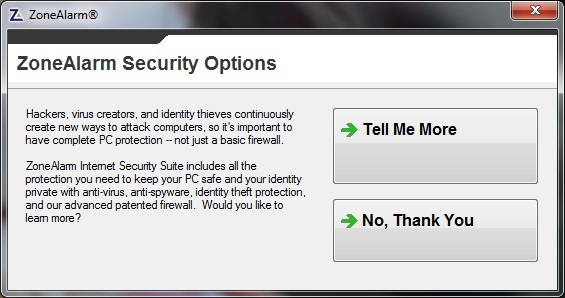
For quite a while I’ve been having to click ‘No, Thank You’ (full marks for good grammar) to the following box – which I tolerated:

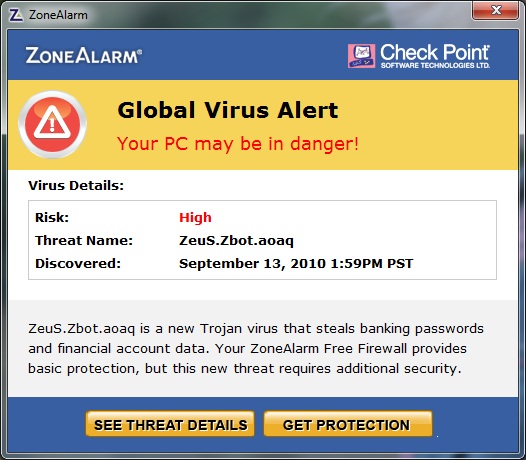
However that was obviously not bringing in enough customers, so they decided to move to what I would class as “scareware” (malevolent software that tries to get you to buy something through fear and lack of understanding):

At first glance it looks like the computer is either infected with a virus, or (to a battle-hardened sceptic like me) it is infected with some malware which is trying to trick you into thinking that it’s ZoneAlarm. These days the malware writers are getting so sophisticated, they’re writing software that looks just like anti-virus software, and I’ve heard that they’re even pretending to BE your software – and so you trustingly provide your credit card details, boom, you’re in trouble as now you have a virus and have just lost a lot of money.

Well, it turns out it’s neither – it’s just the makers of ZoneAlarm trying to convince you that you need to buy their anti-virus software, instead of your current one, and the “See Threat Details” link takes you to a page describing how only their software can defeat this particular virus which you’ve (very probably) not got.

I had a worried phone call from a friend – and not unreasonably so – I remote controlled their computer using LogMeIn (brilliant software by the way) and I spent quite a while trying to figure out if it was genuine – there was nothing obvious on the ZoneAlarm website, and clearly I wasn’t going to click on the link to find out if it was for real! I eventually found other people complaining about it and they’d identified it as genuinely ZoneAlarm, and I was horrified.

This kind of tactic is way below the belt, and as a result I’ve uninstalled ZoneAlarm and will recommend the same to anyone else who asks me about the message. The firewall built into Windows might not be the most amazing, but at least it doesn’t try and sell me something else.

Plugging some free software

by niddler on 18th January, 2010

I had a conversation at lunchtime with one of the many* readers of my blog about their new USB memory stick (which I had found out from their blog) having serendipitously backed up its predecessor for the first time in ages just before it went kaput.

If the same might happen to you and you’d rather not rely on serendipity, then how about using Allway Sync – it’s free, dead easy to install, and you can set it to run in the background on your home PC. Then every time you stick your USB stick in, you’re not having to remember to back it up to a folder on your PC, it’ll do it automatically (and as it only backs up the changes, it shouldn’t take long).

Of course, you’ll have to pay for it if you use it on your work PC, but then what are you doing keeping work on a USB stick – that sort of thing can get you in trouble. If you’re keeping confidential data on anything that’s more portable than a Cray, make sure you keep it in a TrueCrypt volume (also incredibly easy to set up – let me know if you’d like help with one).

*n.b. taking ‘many’ to have the Troll definition of ‘more than 3’.

Next decade delivery service

by niddler on 7th January, 2010

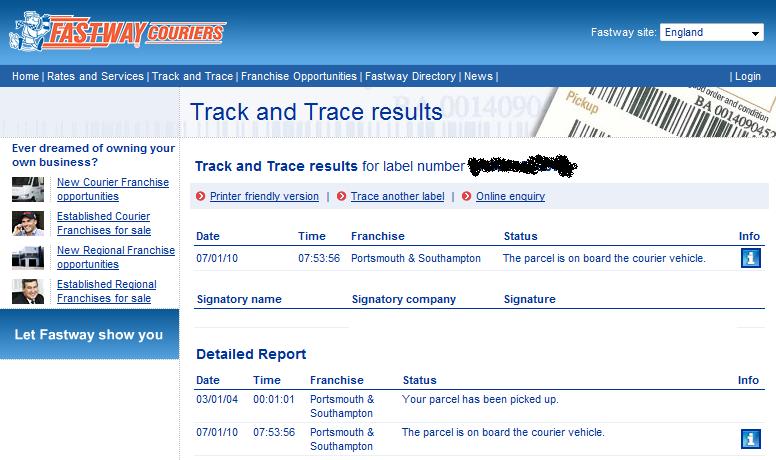
Today I had a parcel delivered from Novatech, they’ve got a new(ish) courier service with a new parcel-tracking system that can be a little flakey…

I think their tracking system is only updated every so often, because I checked this at about 10am and it wasn’t even listed as on the vehicle and now (11am) it’s been delivered! I think that’s a bit poor when compared to their competitors, although I can’t fault them on the delivery itself – especially given the snow and ice!

What you may or may not have noticed in the screenshot (click to enlarge), is that apparently the parcel was picked up on 3rd January 2004 – so it only took 6 years, 4 days, 7hrs to get it from Novatech to the courier vehicle… not the speediest of services, but an impressive use of temporal mechanics to ensure that despite taking years to move the parcel around, it reaches the consumer only DAYS after they’ve ordered it (5th Jan 2010).

Spam of a different sort

by niddler on 4th January, 2010

So, it’s (for me) the first day of the new working year and I log on to my computer with trepidation – what exciting things have happened while I’ve been away?

The main thing that seemed to happen is that someone emailed the wrong distribution list, and caused a mailstorm that has virtually crippled the email server… The original email is (with names tactfully removed) as follows:

From: <person who is no doubt wanting to hide under their desk>
Sent: 31 December 2009 10:20
To: <distribution list>
Cc: <bunch of people>
Subject: Rebuild of DC

All

Forgive me for using this DL, but I am desperately trying to contact someone in the Hungary team who supports Bravura who is in the office today.

I sent the email attached last night with regards to our faulty Domain Controller, and I need to ensure it is being actioned.

Can you please reply if you are able to take ownership of the final steps of this activity please.

<< Message: FW: GBDC1001 >>

Kind regards,

<person who is no doubt wanting to hide under their desk>
Mobile: <deleted to protect the (moderately) innocent>
E-mail: <deleted to protect the (moderately) innocent>

So, what’s the problem? Well, unfortunately the distribution list in question turns out to be one that contains all the people with remote access to the company’s systems… This is tens of thousands of people. Obviously it’s a bit embarrassing when you send an email to the wrong place, but when it goes to that many people you have the problem that people then reply to the distribution list saying “please remove from this distribution list” – and so I had about 350 emails waiting for me – as did the other tens of thousands of people… so at a conservative estimate, 20 million emails which people will now have to delete – and there are still more coming in!

Of course, this is moderately embarrassing for a big IT company to have something like this without any controls to avoid exactly this problem. No doubt someone will have “review email distribution list control” as the second thing on their list of things to do, item number one being “delete spam emails”…

Oh and if you happen to go to the google homepage and click the “I’m feeling lucky” button (at least, at the time of writing) you get a New Year greeting from Google.

Never email me about Viagra

by niddler on 2nd January, 2010

I’ve decided to try and be a bit more frequent with my blogging (n.b. not as a New Year’s resolution), as I’m acutely aware that I’ve posted quite rarely in the last few months – often because I feel like it’d take too long to do, so I’m thinking that if I can get it done in less than 5 minutes per post, then maybe I’ll be a bit more inclined to do it.

This might mean my posts are less thought-provoking and deep – I can already hear the cries of ‘they never were anyway’ – so perhaps that’s not a big problem if I’m trading that in for pith (which handily reduces how long it takes you, the avid reader, to skim through it).

Anyway, this is just to tell you that if you send me an email with the word ‘Viagra’ in it, it’s likely to disappear, as I get around 2,200 spam emails each month, and while checking the 100 that arrived in the last 48hrs for ‘ham’, I noticed that virtually all of them were about Viagra – so I did a quick search (using the handy google-searching capability over my email) – and found that 61% of my spam mentions Viagra. I’m actually very impressed with the google spam filter – I don’t remember the last time it missed one, and I find about 1 ham in a month, and it’s always some newsletter from a company I’m not that interested in – so no big loss.

On a side note (and I really will stop before this gets into an epic post) I get so much spam that if I want to – I can monitor the ebb and flow of the spam tide – to the point that I actually noticed when a big player was taken down just over a year ago. Now I just need to figure out how to convince them I’m really not interested in buying any pills…