Posts Tagged ‘computers’

New Home

by niddler on 14th June, 2014

Well, after something approach 15 years (by my guess) I’ve grown up and stopped sponging off the highly-patient James, who has provided my web hosting for all this time (at cost price) – and I’ve gone and got myself a proper hosting.

It’s been a bit interesting, and I hope I didn’t lose too many of Mrs Niddler’s emails, nor those of The Mother Ship – but having done so it’s given me plenty of opportunities too – so for instance I’ve moved my blog into its own subdomain (blog.niddler.com) and mucked around with WordPress installations like they’re going out of fashion… and I’ve learned a few things along the way.

Hopefully both my faithful readers will be able to continue to read my blog without noticing a whole lot of difference…

So I just got spammed by your email account

by niddler on 28th November, 2010

So here’s the thing. In the last 6 months or so, I’ve received spam from 4 different friends of mine – each had their email account compromised and the nefarious hackers used their account to send spam to people in their address book (which is much harder for a spam filter to detect, as obviously you get real emails from this person as well).

For three of the four occasions, I happened to be sat at my computer when the spam came in – so I immediately responded by contacting the person whose account had been compromised with some advice on what to do.

Given how often this now seems to be happening, I thought I’d write a simple guide in this post – so next time I don’t have to explain it all over again!

The spammers almost certainly gained access to your email account using by far the easiest method – they used your password. Therefore the first thing you need to do if this has happened to you, is change your password. Then change any other online service that you’ve registered with that uses the same email address and password – as any hacker worth their salt will trawl popular sites (amazon, ebay, paypal etc) and then have a fun time with your accounts there too.

How did they get the password? This is the next most important thing to try and figure out, there are several possible methods:

  • They guessed it. It’s not terribly hard to set a computer to go through the dictionary, trying each word as a password for a known email address – at least one of the victims had used a dictionary word as their password. Hackers even have special dictionaries of common passwords that aren’t in the dictionary. If your password was straight out of the dictionary – that’s quite likely how they got it, and if you’ve not been hacked but your password is that easy to guess – change it before you are the next victim!
  • They got you to tell it to them. There are two common ways of doing this:
    • Phishing – very common these days. They send you an email that directs you to a website giving you a fake login screen, you type in the password and presto, you’ve just handed over your password.
    • Password reuse – you signed up for something on the web that provided a legitimate service (unbeknownst to you it was run by, or subsequently compromised by, hackers) which asked for an email address and password, and you used the same password as for your email account. Obviously it then doesn’t take much for them to see if the password you provided them works with your email account.
    • Internet Cafes – these have the same computer hygiene level as a public toilet in France. Tread with caution – even if the person running the cafe is legitimate (potentially a very big ‘if’ in some countries), then you have to account for all the other people who might be there – often using a kind of a variant of the next method…
  • They stole it from your computer. If they’ve compromised your computer with malware, they can install a keyboard logger and other tricks that can snatch your password right out of the keyboard as you type it. They can sometimes (depending on your browser security) steal it from your saved passwords on the computer itself without you pressing a key. This is by far the most serious, as obviously the hacker is only mildly interested in your email account, what they REALLY want is your internet banking details.

If you suspect the last couple of options might be possible, and that particularly internet banking details might be at stake, it’s worth contacting your bank immediately – as then any fraud (which you might be financially liable for – as technically you gave the hacker your password) won’t be your responsibility. If it’s potentially the last option, then you would do well to run a full malware scan using something such as superantispyware.

If you’re thinking that you couldn’t possibly remember all the passwords for your different online services if you had to use a different password for each one, then get yourself a password safe such as KeePass – then have one ‘master’ password (which you (i) must not forget and (ii) better make a good’un!) which gives you access to all the rest. Password protected Word documents or Excel spreadsheets are useless – I’ve got a macro that can strip the password from those in under 30 seconds.

Wishing you a happy, and safe internet journey – and if I’ve prompted you to change your password from to something a bit more secure (or possibly just different for each service)… then my work here is done.

Scareware

by niddler on 19th September, 2010

So, CheckPoint Software Technologies have just lost a (free) customer, and potentially several others.

They’re the makers of the most popular free computer firewall – ZoneAlarm.

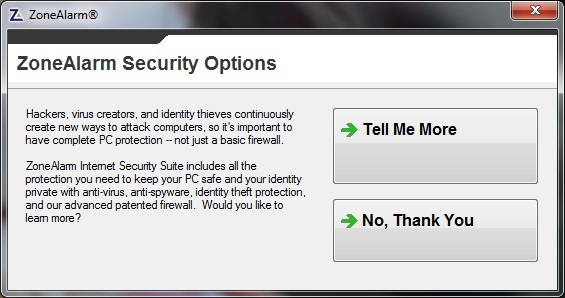
For quite a while I’ve been having to click ‘No, Thank You’ (full marks for good grammar) to the following box – which I tolerated:

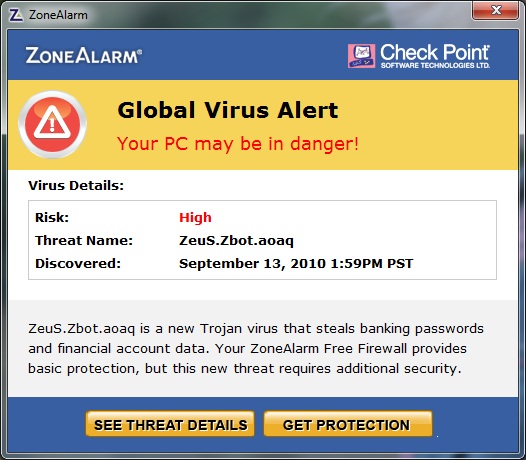
However that was obviously not bringing in enough customers, so they decided to move to what I would class as “scareware” (malevolent software that tries to get you to buy something through fear and lack of understanding):

At first glance it looks like the computer is either infected with a virus, or (to a battle-hardened sceptic like me) it is infected with some malware which is trying to trick you into thinking that it’s ZoneAlarm. These days the malware writers are getting so sophisticated, they’re writing software that looks just like anti-virus software, and I’ve heard that they’re even pretending to BE your software – and so you trustingly provide your credit card details, boom, you’re in trouble as now you have a virus and have just lost a lot of money.

Well, it turns out it’s neither – it’s just the makers of ZoneAlarm trying to convince you that you need to buy their anti-virus software, instead of your current one, and the “See Threat Details” link takes you to a page describing how only their software can defeat this particular virus which you’ve (very probably) not got.

I had a worried phone call from a friend – and not unreasonably so – I remote controlled their computer using LogMeIn (brilliant software by the way) and I spent quite a while trying to figure out if it was genuine – there was nothing obvious on the ZoneAlarm website, and clearly I wasn’t going to click on the link to find out if it was for real! I eventually found other people complaining about it and they’d identified it as genuinely ZoneAlarm, and I was horrified.

This kind of tactic is way below the belt, and as a result I’ve uninstalled ZoneAlarm and will recommend the same to anyone else who asks me about the message. The firewall built into Windows might not be the most amazing, but at least it doesn’t try and sell me something else.

Plugging some free software

by niddler on 18th January, 2010

I had a conversation at lunchtime with one of the many* readers of my blog about their new USB memory stick (which I had found out from their blog) having serendipitously backed up its predecessor for the first time in ages just before it went kaput.

If the same might happen to you and you’d rather not rely on serendipity, then how about using Allway Sync – it’s free, dead easy to install, and you can set it to run in the background on your home PC. Then every time you stick your USB stick in, you’re not having to remember to back it up to a folder on your PC, it’ll do it automatically (and as it only backs up the changes, it shouldn’t take long).

Of course, you’ll have to pay for it if you use it on your work PC, but then what are you doing keeping work on a USB stick – that sort of thing can get you in trouble. If you’re keeping confidential data on anything that’s more portable than a Cray, make sure you keep it in a TrueCrypt volume (also incredibly easy to set up – let me know if you’d like help with one).

*n.b. taking ‘many’ to have the Troll definition of ‘more than 3’.

Next decade delivery service

by niddler on 7th January, 2010

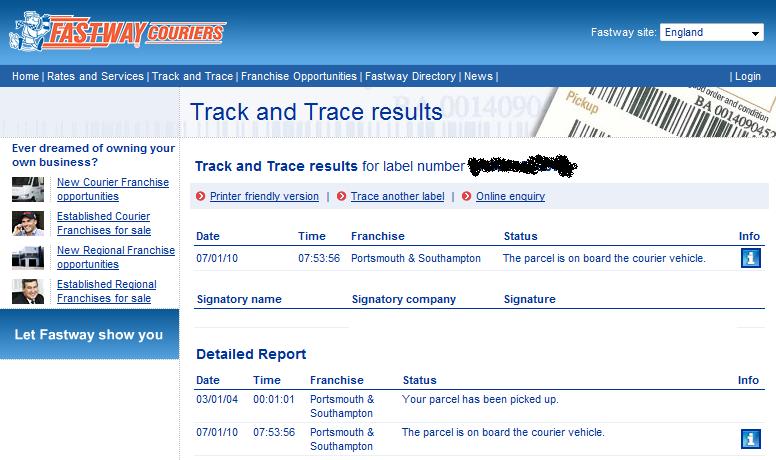
Today I had a parcel delivered from Novatech, they’ve got a new(ish) courier service with a new parcel-tracking system that can be a little flakey…

I think their tracking system is only updated every so often, because I checked this at about 10am and it wasn’t even listed as on the vehicle and now (11am) it’s been delivered! I think that’s a bit poor when compared to their competitors, although I can’t fault them on the delivery itself – especially given the snow and ice!

What you may or may not have noticed in the screenshot (click to enlarge), is that apparently the parcel was picked up on 3rd January 2004 – so it only took 6 years, 4 days, 7hrs to get it from Novatech to the courier vehicle… not the speediest of services, but an impressive use of temporal mechanics to ensure that despite taking years to move the parcel around, it reaches the consumer only DAYS after they’ve ordered it (5th Jan 2010).

A good evening’s work

by niddler on 5th November, 2009

inbox

It’s taken me all evening to get through my emails, but I’ve done it… what a beautiful sight – an empty inbox! Place your bets on how long it’ll stay like that, and I’m not counting the emails I’ll get telling me you’ve commented or ones you send me in a blatant attempt to fill my inbox with junk* – that’s kind of a self-fulfilling prophecy – there will be absolutely no prize beyond the kudos to the nearest guess.

*I remember when I was at Uni, I showed Rob how I could use a cron job to send him an email each morning saying something along the lines of “Good morning Rob! How are you?” and he really liked it (and occasionally it highlighted when the email server hadn’t been working at whatever time it was I’d set it to go).

One of our slightly less computer-literate classmates decided to do the same thing to Rob, but with a less friendly message (something like “Morning Rob, you stink” or an equally uplifting message). Unfortunately he didn’t read the instructions for setting up a cron job, nor did he test it by sending himself the message first… and so he accidentally sent Rob an email every MINUTE from the afternoon when he set it up until the next morning when Rob asked him to stop – as his mailbox was somewhat overloaded!

blog: customisation

by niddler on 21st March, 2009

I thought it was about time I moved away from the standard WordPress blog theme and returned to my own inimitable niddler.com style. Of course, some things have to be updated for the modern world, but it’s actually only taken me a few minutes (and a bit of a dirty hack-job on a few files) to get things in a more pleasing state.

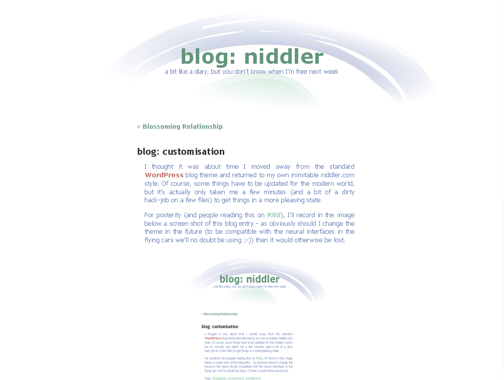
For posterity (and people reading this on RSS), I’ll record in the image below a screen shot of this blog entry – as obviously should I change the theme in the future (to be compatible with the neural interfaces in the flying cars we’ll no doubt be using ;-)) then it would otherwise be lost.

screenshot-niddlertheme

An atomic bomb(shell)

by niddler on 7th March, 2009

I’ve just helped Mrs Niddler’s mother to buy a new computer – a Novatech Ion – a desktop PC about the size of a shoebox and based on the Intel Atom processors they’re putting in the ultra low-power netbook laptops.

It’s a very cheap, very very energy-efficient little box, and I’ve gotta say I’m impressed – it’s taken a little under 2 hours to set it up and install Office 2007, Firefox, Thunderbird, Acrobat, Flash, Skype, AVG, Quicktime, IE7, WMP11 (not necessarily in that order) – and that includes the time to take it out the box! For a PC which costs just over £200 (not including monitor etc), this is a real bargain of price and performance.

When I say it’s energy-efficient, allow me to provide a bit of scale…

Intel say that these Atom processors use 1-2.5W of energy, whereas my CPU (which admittedly cost 2/3 the price of her PC, so you’d expect it to be a bit more powerful) is the quad-core Q6600 SLACR (letters and numbers provided to impress geeks) – it is described as the “energy-efficient” member of its class – weighing in at a dainty 95W – so around 40 times more power-hungry. Either my CPU is secretly part of a campaign to speed up global warming, or they’ve done something very special with this little Atom chip.

Speaking of my CPU, I bought it for £129 just over 8 months ago and recently had cause to look up its price again.You’d think that the march of technology would have done two things to it, as it gathers dust inside my computer:

  • It would have become significantly cheaper
  • It would have become obsolete and generally looked a bit ancient

Well, boy would you be wrong. Not only is it still on sale, but its gone up in price. Yes, computer equipment has suddenly become a method of long-term savings and investment*, as this baby is now costing £166.74 (at time of writing) – that’s an equivalent to an annual interest rate of sixty percent – eat your heart out Bank of England!

*please note: this may be a dramatic overstatement.

Although part of the price rise is due to the change in currency exchange rates, it becomes even more bizarre when you discover that I didn’t buy the CPU when it first came out – it’s now been on the market for very nearly TWO YEARS and still holds a very respectable place in the rankings.

I remember a time when you had to buy the latest PC magazine if you wanted to look at prices for things, as the CPU on the bottom of the list disappeared each month because technology was moving at such a pace (and it only took a 12-18 months for something to pass from the top of the pops to down in the dumps).

How times have changed! Well ok, hard drives, memory, flat screen monitors, wireless routers, broadband and a load of other gadgetry have plummeted in price and exploded in capacity over the last couple of years, and processor speed has continued to increase but perhaps Moore’s Law is no longer the factor – we need to introduce niddler’s law:

Beyond a certain point, most people won’t care if technology advances are made in either speed or capacity, as it won’t make a noticeable difference to their usage of it.

[unless Microsoft deliberately makes each successive operating system more power-hungry – but I’m sure they wouldn’t do that]

Not perhaps as ground-breaking as Moore’s law, and possibly a statement of the obvious, but I’m claiming it as niddler’s law and you heard it here first – should anyone ever decide they want to use it in the future, they have to pay me commission, or at least kudos. I await the Wikipedia article glorifying my wisdom.